Everything Aldoo Snap can do
Screenshots, screen recordings and webcam captures — turned into shareable links the instant you take them. Here's everything packed into one lightweight menu bar app.
Screenshot exactly what you need
Freeze a custom area, grab a single window, or capture the full screen — every screenshot mode lives one hotkey away in the menu bar.
- Frozen-selection area shots you can resize before you shoot
- Full-screen or single-window captures in one click
- Every mode on its own global hotkey
Capture the whole page, not just what fits
Scroll Snap scrolls and stitches automatically, so long web pages, chats and documents become one clean image — no manual scrolling and cropping.
- Captures long pages, chats and docs in full, not just the visible part
- Scrolls and stitches together automatically while you watch
- Delivered as a single, full-length image
Record your screen, a window, or just yourself
Record a custom area, a single window, or the full screen — with mic audio built in, or flip to camera-only for a quick face-cam take.
- Record a custom area, a window, or the full screen
- Camera-only recording straight from your webcam
- Mic audio included, no extra setup
Webcam shots without opening another app
Fire the webcam straight from the menu bar — a countdown, a roll of frames, and each one ready to annotate or share.
- 3-2-1 countdown before every shot
- Multi-frame roll so you can pick the best take
- Annotate or share each frame instantly
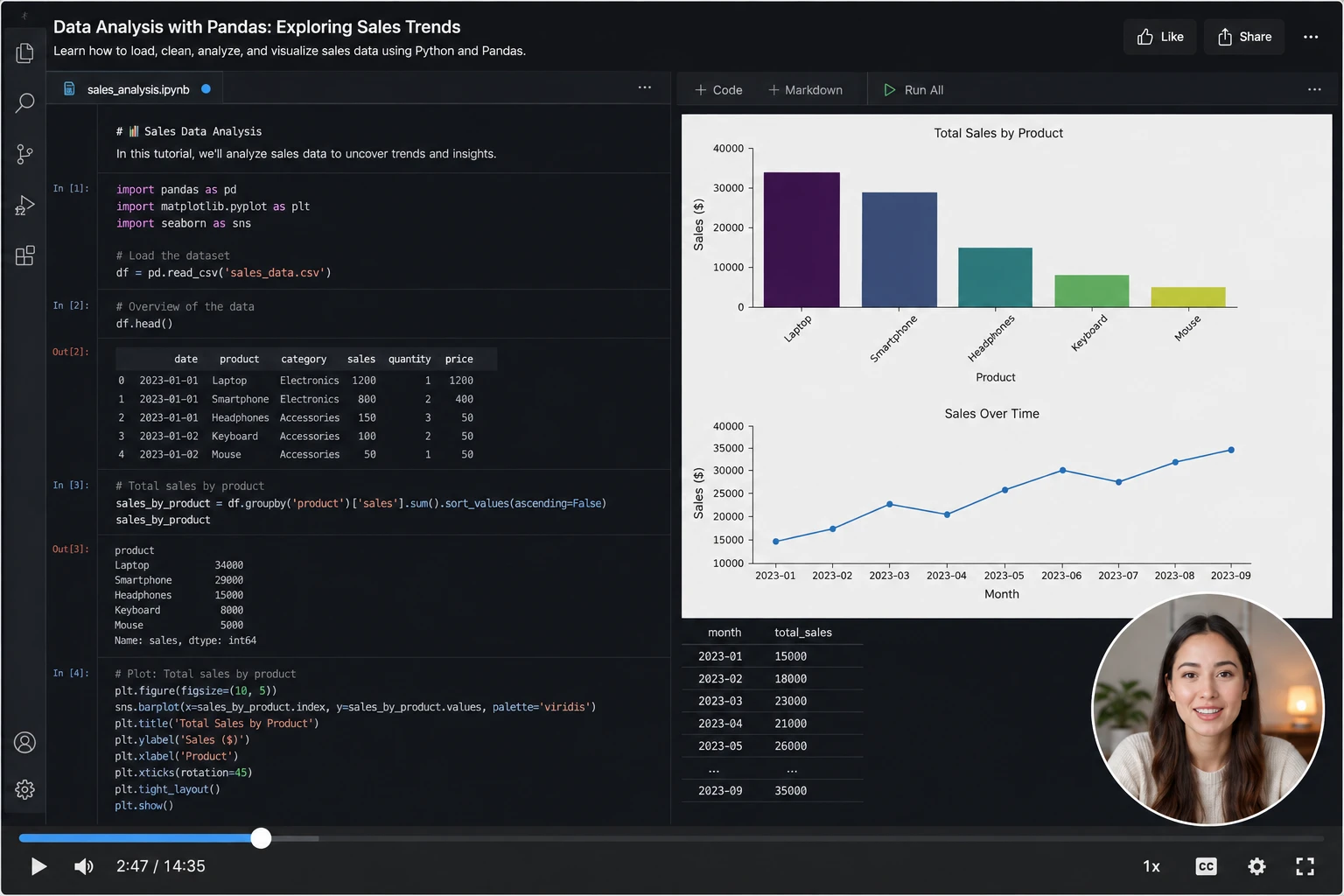
Record it, explain it, share it
Screen-record with a movable webcam bubble so your face stays on screen while you talk through it — perfect for tutorials and walkthroughs, no separate editor needed.
- Movable webcam bubble keeps you visible over the recording
- One link to share the finished recording, ready to watch instantly
Mark it up before you send it
Pen, highlighter, arrows, numbered steps and text — added straight on top of the capture, before or after you share it.
- Draw, highlight and add arrows on any screenshot or frame
- Numbered steps for quick walkthroughs
- Edits apply before the link ever goes out
Hide what shouldn't be shared
Censor emails, faces, keys and anything sensitive before the capture leaves your Mac — smooth blur, pixelation, solid color, or an emoji sticker on top.
- Smooth blur or pixelate any area of the capture
- Solid-color redaction for names, emails and keys
- Emoji stickers with rotation for a friendlier cover-up
Measure and align like a designer
Rulers along the capture edges, click-to-drop guide lines, and a measure tool that reads out distances in pixels — pixel-perfect specs straight from the screenshot.
- Rulers around the selection, always in device pixels
- Click a ruler to drop horizontal or vertical guides
- Measure tool shows the exact distance between any two points
Pull a color palette from any capture
Extract the dominant and accent colors of any screenshot into a ready-to-use palette, or pick a single pixel with the magnifying eyedropper — perfect for branding, mood boards and matching visuals.
- One-click palette of the dominant and accent colors
- Magnifying eyedropper copies any pixel's hex code
- Save the palette as an image or share it with a link
Every capture is a link before you know it
The moment you take a screenshot or finish a recording, it uploads to the cloud and the link lands on your clipboard — ready to paste anywhere.
- Link copied to your clipboard before the upload even finishes
- Opens in any browser, no account needed to view it
- Works the same for screenshots, recordings and photo booth shots
Every feature at a glance
Swipe or drag to explore
Area capture
Freeze any area of your screen, resize the selection, then screenshot or record it.
Window capture
Grab a single window cleanly — screenshot or video, no cropping needed.
Full-screen capture
One shortcut for the whole screen, as an image or a recording.
Scroll Snap
Stitch a full scrolling page or document into one long image, automatically.
Photo booth
Webcam shots with a countdown, or a movable bubble while you record.
Screen & camera recording
Record any area, window or screen, with mic audio built in.
Audio recorder
Capture voice or system audio on its own, no video required.
Instant share links
Every capture uploads and copies its link before you even let go of the shortcut.
Annotate everything
Pen, highlighter, arrows and text, added right on the capture.
Color palette & eyedropper
Extract a palette from any capture, pick pixels with a loupe, copy hex codes in a click.
Blur & redact
Blur, pixelate, black out or emoji-cover sensitive parts before the link goes out.
Rulers, guides & measure
Drop guides from the rulers and measure pixel distances right on the capture.
Global hotkeys
Every capture mode rebindable to its own system-wide shortcut.
Area capture
Freeze any area of your screen, resize the selection, then screenshot or record it.
Window capture
Grab a single window cleanly — screenshot or video, no cropping needed.
Full-screen capture
One shortcut for the whole screen, as an image or a recording.
Scroll Snap
Stitch a full scrolling page or document into one long image, automatically.
Photo booth
Webcam shots with a countdown, or a movable bubble while you record.
Screen & camera recording
Record any area, window or screen, with mic audio built in.
Audio recorder
Capture voice or system audio on its own, no video required.
Instant share links
Every capture uploads and copies its link before you even let go of the shortcut.
Annotate everything
Pen, highlighter, arrows and text, added right on the capture.
Color palette & eyedropper
Extract a palette from any capture, pick pixels with a loupe, copy hex codes in a click.
Blur & redact
Blur, pixelate, black out or emoji-cover sensitive parts before the link goes out.
Rulers, guides & measure
Drop guides from the rulers and measure pixel distances right on the capture.
Global hotkeys
Every capture mode rebindable to its own system-wide shortcut.
Area capture
Freeze any area of your screen, resize the selection, then screenshot or record it.
Window capture
Grab a single window cleanly — screenshot or video, no cropping needed.
Full-screen capture
One shortcut for the whole screen, as an image or a recording.
Scroll Snap
Stitch a full scrolling page or document into one long image, automatically.
Photo booth
Webcam shots with a countdown, or a movable bubble while you record.
Screen & camera recording
Record any area, window or screen, with mic audio built in.
Audio recorder
Capture voice or system audio on its own, no video required.
Instant share links
Every capture uploads and copies its link before you even let go of the shortcut.
Annotate everything
Pen, highlighter, arrows and text, added right on the capture.
Color palette & eyedropper
Extract a palette from any capture, pick pixels with a loupe, copy hex codes in a click.
Blur & redact
Blur, pixelate, black out or emoji-cover sensitive parts before the link goes out.
Rulers, guides & measure
Drop guides from the rulers and measure pixel distances right on the capture.
Global hotkeys
Every capture mode rebindable to its own system-wide shortcut.