
Some updates don't need a meeting — they need thirty seconds of someone talking. But the alternative to a meeting is usually a wall of typed text trying to explain something that would take ten seconds to say out loud. AldooSnap's audio recorder is built for exactly that gap: faster than typing, lighter than scheduling a call.
Not Every Update Needs a Meeting
Calendars fill up with fifteen-minute syncs that exist mainly to say one thing out loud, because writing it down felt like it would take longer or lose the nuance. Meanwhile the actual update — "here's why I made this call," "here's what's blocking me," "here's the context on this ticket" — really is just a short voice note away from being said once and reused by everyone who needs it.
Say It Once, Send It Anywhere
AldooSnap records audio the same way it captures everything else: fast to start, and done as a link the moment you stop, so it can be dropped into whatever chat or ticket the update belongs in.
- Click the AldooSnap icon in the menu bar and choose Audio → Recorder.
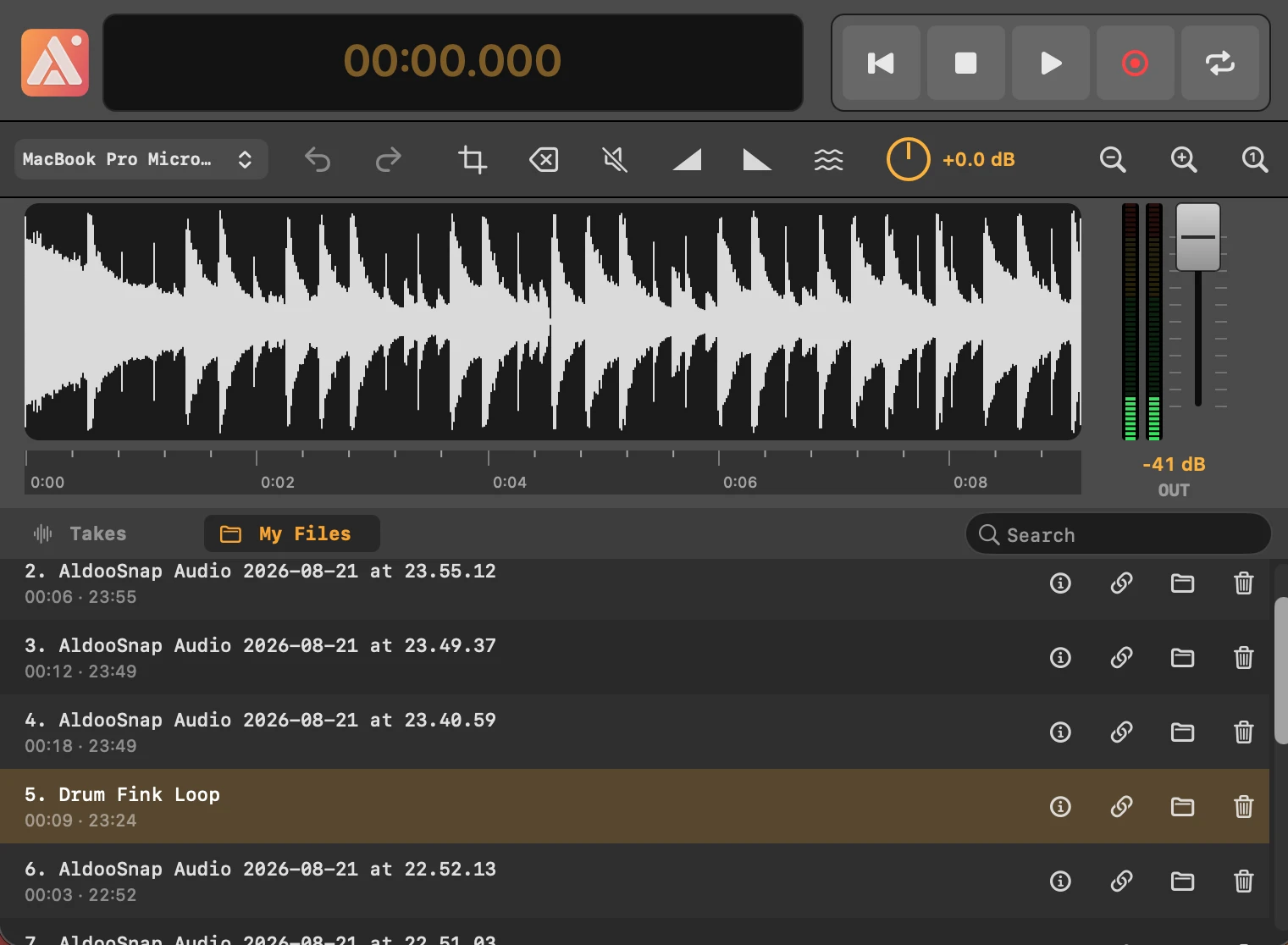
- Click the record button. A live waveform shows the input level while you talk, with a running timer.
- Click the same button again to stop. The take lands automatically in the list below.
- Click the Copy share link icon on that take to upload it and copy a share link.
- Paste the link wherever the update needs to go.
Every Take, Searchable Later
Recordings from the current session sit in a Takes list, and a My Files tab covers everything you've ever recorded — both searchable by filename. Double-click a take's title to rename it on the spot, so six months from now "async update" isn't a list of takes named by timestamp alone.
Trim Out the Fumbling
Nobody nails the first few seconds of a recording. Drag across the part of the waveform you want gone and click the crop button in the editing toolbar to cut it — the same selection-based trim as video, just applied to sound instead of picture. No separate audio editor required.
Pair It With a Screenshot When Words Alone Aren't Enough
A voice note explaining a decision often makes more sense next to the thing being discussed. Take an Image → Area screenshot of the screen in question, copy its share link, then record a voice note walking through it and send both links together — the explanation and the reference stay linked without needing a video.
Not every conversation needs to happen live, and not every explanation needs to be typed. A voice note fills the space in between — quicker to make than an essay, easier to fit into someone else's day than a meeting.